The way people explore identity, create content, and have fun online has been permanently changed by a single category of AI tool. The AI Gender Change Filter by SuperMaker AI represents the current pinnacle of this shift — a browser-based, no-signup, watermark-free solution that transforms any photo into a hyper-realistic gender-swapped version within seconds. Whether you’re a content creator chasing viral engagement, a curious individual exploring a new look, or a team looking for a memorable icebreaker, this technology delivers results that feel genuine rather than gimmicky. This guide covers everything you need to know: what it is, how it works, what makes it stand out, and practical tips for getting the best possible output every time.
What Is an AI Gender Change Filter?
An AI gender change filter is a tool that transforms a face photo into a gender-swapped version using generative AI. Unlike traditional filters that only change hair, makeup, or surface details, AI-based tools can adjust multiple facial features together to create a more consistent result.
This is why the effect feels more realistic. The AI can reshape and refine important details such as facial structure, skin texture, hairstyle, and other appearance cues while still keeping the person recognizable. That balance between realism and identity is what makes this kind of tool so engaging.Part of the appeal comes from seeing how relatively small adjustments to certain facial characteristics can influence overall perception. Features such as the jawline, nose, cheeks, forehead, and eyes all contribute to how a face is interpreted, which is why conversations about appearance often extend beyond filters and photo editing tools. People interested in understanding the impact of different facial feature changes frequently explore how specific characteristics can shape a softer or more traditionally feminine look, even when they’re simply comparing possibilities rather than pursuing any permanent changes.This combination of familiarity and transformation is what makes AI-generated results feel both surprising and believable at the same time.
Why Use SuperMaker AI’s Gender Change Filter?
More Realistic Results Many AI gender swap tools only change surface details like hair or makeup. SuperMaker AI creates more natural-looking transformations by adjusting facial features, style, and other visual details in a more balanced way.
Fast and Easy to Use The tool works on desktop, tablet, and mobile devices. Just upload a photo, generate the result, and download it in one simple flow.
Stronger Privacy Protection User privacy matters. Photos are processed securely and removed after generation, giving users more confidence when uploading personal images.
Watermark-Free Output Downloaded images come without watermarks, making them easier to share on social media or use in creative projects.
How to Use the AI Gender Change Filter
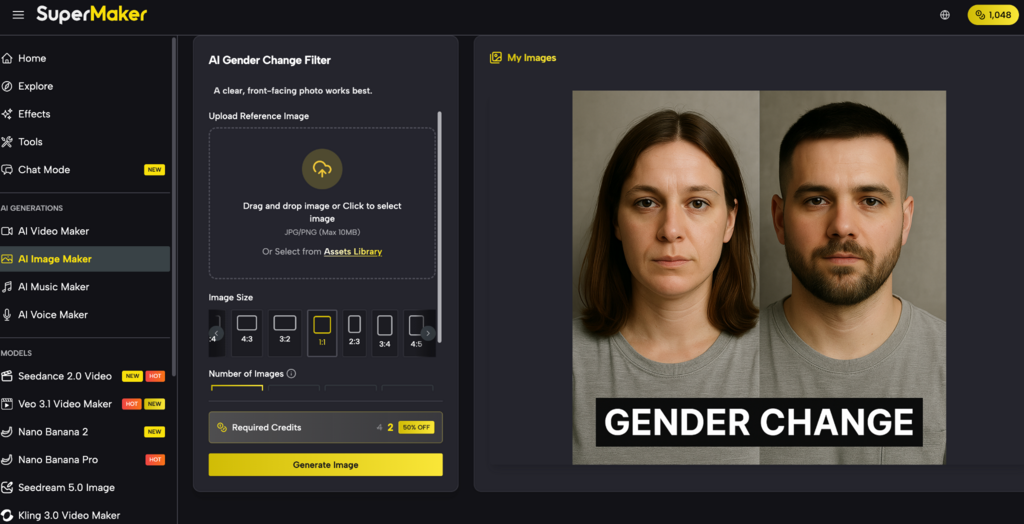
Step 1 — Upload Your Photo
Visit the SuperMaker AI gender change filter page and upload a clear JPG, PNG, or WEBP image (up to 10MB).
Pro Tip: Use a well-lit, upper-body or full-face shot with a relatively simple background. Group photos are also supported!
Step 2 — Apply the Transformation
Select your target gender direction and hit generate. Within seconds, the AI engine analyzes the facial geometry and coordinates adjustments across facial structure, hair, skin tone, and cosmetic details.
Step 3 — Preview and Download
Review the high-resolution render directly in your browser. If you love it, download it instantly (watermark-free) and share it to your favorite social platforms. If you want a different vibe, simply re-upload a photo with different lighting or angles.
Key Features of the SuperMaker AI Gender Change Filter
Realistic One-Click Gender Swap
The core feature is its one-click transformation pipeline. Unlike complex photo editors that require layer management, masking, or manual brush work, SuperMaker AI performs the entire transformation automatically from a single upload action. This makes the tool genuinely accessible to users with zero photo editing experience while still producing outputs that rival professional compositing work.
Multi-Face Group Photo Support
One of SuperMaker AI’s standout differentiators is its ability to process multiple faces simultaneously in a group photo. Each person in the frame receives an individually tailored transformation — the AI doesn’t apply one generic swap across all faces but analyzes each face independently for personalized results. This feature makes the tool uniquely suited for creative storytelling, themed content creation, team projects, and entertaining social experiments.
Instant Processing with No Queue Delays
Results are returned within seconds, not minutes. This speed isn’t incidental — it reflects SuperMaker AI’s infrastructure investment in fast model inference. For social media creators whose publishing workflows depend on rapid asset production, the difference between a five-second result and a two-minute result is meaningful. Fast processing also enables quick iteration: generating multiple versions of a transformation in a single creative session is practical.
Who Should Use an AI Gender Change Filter?
The tool’s utility extends across a surprisingly wide range of user types:
- Social media content creators looking for original, shareable content that drives engagement and follows current viral trends
- Photographers and digital artists who want to explore alternate visual narratives for portraits or character designs
- Individuals curious about identity who want a private, non-committal way to visualize themselves differently
- Marketing teams experimenting with mascot variations, campaign visuals, or audience-targeted creative assets
- Educators and facilitators using the tool to spark conversations about identity, perception, and representation in workshops or classroom settings
- Friends and families looking for a lighthearted, entertaining shared activity that generates memorable and often hilarious results
Frequently Asked Questions
Do I need to create an account to use the filter?
No. SuperMaker AI’s gender change filter is accessible without login or sign-up. The free plan allows users to explore features immediately upon visiting the page.
Can I use generated images commercially?
Yes, provided the source image does not contain copyrighted material such as brand imagery or celebrity portraits. Original personal photos and non-copyrighted creative content can be commercially used.
How long does the transformation take?
The AI processes uploads and returns results within seconds. There is no queue system or extended wait time for standard transformations.
Is my photo stored after processing?
No. All uploaded photos are encrypted during processing and automatically deleted after the transformation is generated. SuperMaker AI does not retain user images.
Does it work on older or lower-quality photos?
The tool works best on high-resolution, well-lit images. Older or low-quality photos may produce less precise results, though the AI will still attempt a transformation if a face is detectable.
Try the AI Gender Change Filter Now
The technology has matured to the point where there is no good reason to settle for low-quality, watermarked, or unconvincingly artificial gender swap results. If you’re ready to experience what a genuinely advanced transformation looks like — one that preserves your facial identity while producing a realistic and strikingly natural alternate-gender version — the AI Gender Change Filter by SuperMaker AI is waiting. Upload your photo for free, see the result in seconds, and download it watermark-free for immediate sharing. No account required. No cost. Just your photo and a few clicks between you and a result worth sharing.